Case Study: A 90-Minute Monthly Audit Reduced to Two Minutes
In a Nutshell
Every month, a local nonprofit was manually reviewing thousands of time records from a staff of more than 250. Remarka replaced the error-prone five-step manual audit with a single scripted step that saves time, eliminates inconsistent judgments and mistakes, and produces a clear, human-readable report.
-
45x faster
90 min down to 2 min
Per audit -
from 5 to 1
Manual steps
now automated -
less than 2 days
From discussion
To delivery -
less than $1,000
One-time,
all-in
The Problem
This organization has employees at numerous locations across St. Louis. Employees are required to clock in from a webpage on a company computer at an approved location. The organization's older timekeeping system cannot prevent someone from using a phone or home computer, but it does record the internet address associated with every clock-in.
There was one significant constraint: Budget. There was no money to invest in a more proactive fix of the infrastructure or the enterprise timekeeping system itself. That left the organization's Human Resources team responsible for reactive enforcement.
Each month, a senior employee exported a 150+ page report containing roughly 4,200 records and reviewed it by hand.
The audit depended on knowledge that lived mostly in one person's head:
- Which internet addresses belonged to which locations (aka static IPs)
- Which locations did not have a static internet address (aka dynamic IPs)
- How overnight shifts were tracked and communicated in the log
- How to handle employees working at different locations
- Which unfamiliar internet addresses were legitimate (aka false-positives)
- Which records represented likely violations and needed research
The organization already was using a widely adopted enterprise timekeeping platform, but it could not produce the audit HR needed. The client could have asked the vendor to build a custom report, but based on past experience, the client expected that process to take weeks and cost thousands of dollars. That was far more than this problem justified.
Given the constraints, the question was simple: How might we minimize the time and effort of a monthly reactive timeclock audit while maximizing accuracy?
How We Worked
1. Uncover the rules
The client and I spent about 60 minutes walking through their current audit process, including looking at the export files and discussing known rules and exceptions. This turned the client's unwritten knowledge into clear business rules that could be scripted.
2. Build with real data
Once I could see the export and understood the business rules, it was clear that a simple deterministic script with a plain-English summary would get the client the best bang for their buck. I used several export samples to build a working version of the report app. It processed the full exports and produced a findings report that the client could evaluate immediately.
3. Identify gaps and iterate
Upon looking at the first version of the new report, the client noticed problems. This triggered a second conversation, about 30 minutes, that revealed a slew of additional business rules, legitimate exceptions, and data format nuances that were not part of the initial conversation but were equally critical to being able to accurately process the timeclock data.
4. Improve the report
Once all business rules were accounted for and added to the program, we added useful views that had not been practical before, including month-over-month trends and how each location actually clocks in.
5. Test and package it
AI helped me write and test the program quickly. I stress-tested it with hundreds of thousands of synthetic records, clean data mixed with malformed, broken and edge-case records, deliberately trying to break it so the failures surfaced here rather than in front of the client. The tool was packaged as a simple double-click Windows application the client could run without technical help.
The Finished Solution
Instead of reviewing a 150+ page report, the HR team now receives a short report that:
- Lists likely violations with the evidence behind each one.
- Separates records that need a human review, often revealing a business rule worth adding.
- Shows month-over-month trends and how each location clocks in.
Each result includes a plain-English explanation. The client leadership still makes any final personnel decision, but no longer has to search thousands of rows to catch problems and document the evidence.
The program follows the same written rules every time, eliminating varying judgment and misses. It does not use any AI.
Before & After
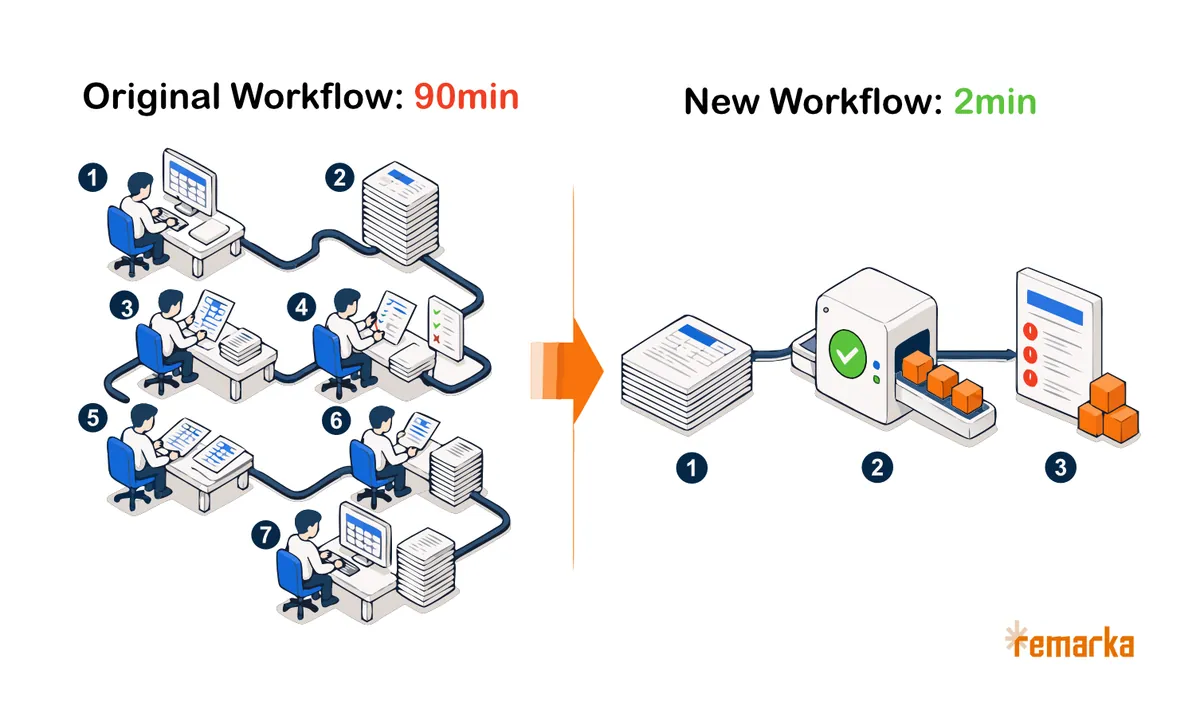
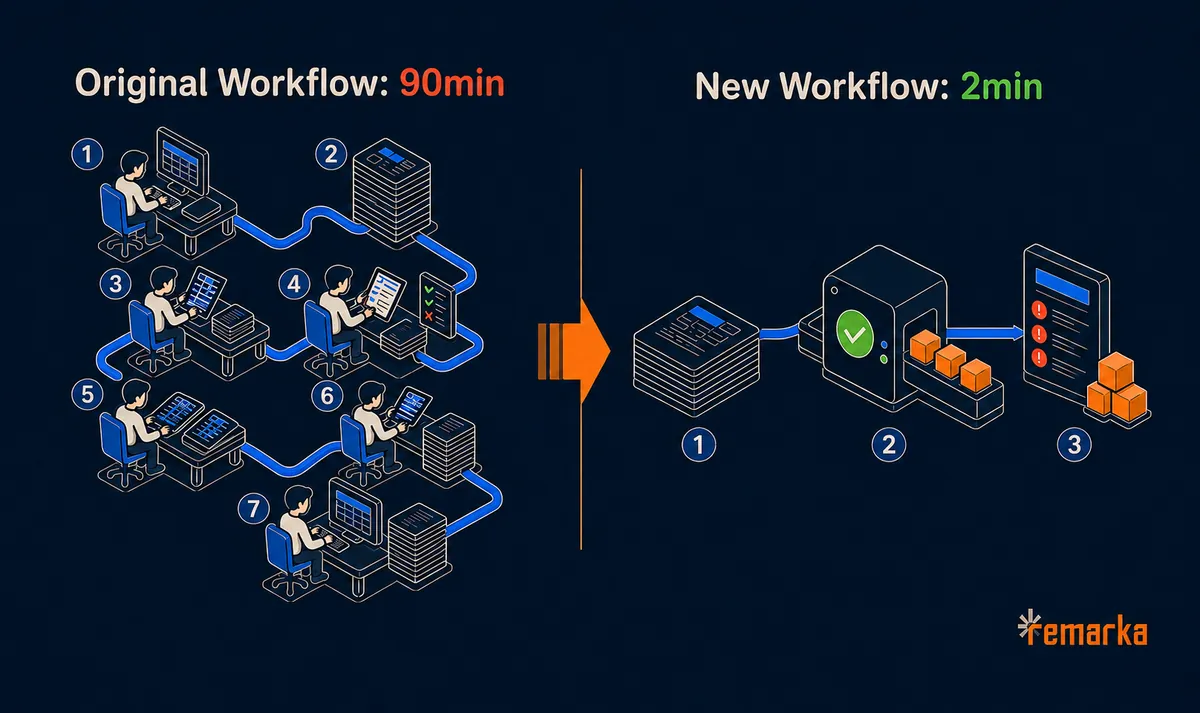
The complete workflow originally had seven steps:
- Export the timeclock data
- Visually scan roughly 4,200 rows
- Use internet tools to look up unfamiliar internet addresses
- Make individual judgment calls
- Investigate possible violations
- Document violations and summarize the findings
- Communicate the findings
The first and last steps remain, but the five-step manual process in the middle turned into a single step:
- Export the timeclock data
- Run the application on the export
- Communicate the findings
The application now handles the sorting, internet address lookups, documented exceptions, historical comparisons and report creation.
Business Impact
About two minutes per month
Exporting the data takes about one minute, running the program takes roughly 20 seconds, and reading the report takes about 15 seconds. Allowing for normal handling time, the task takes about two minutes.
That reduces the annual workload from roughly 18 hours to about 24 minutes.
Missed rows and inconsistent judgments eliminated
The audit no longer depends on someone visually scanning thousands of rows or remembering how a similar record was handled last month. This eliminates accidentally missed records and inconsistent judgment calls from the audit process.
Previous violations uncovered
Testing six months of historical records found actual violations that earlier manual audits had missed.
Fewer false alarms
Legitimate exceptions are now part of the audit rules, reducing the chance that an employee is questioned over unusual but permitted activity.
Easy to delegate
The knowledge required to perform the audit now lives in the program instead of one employee's head. Someone else can run it without learning every rule and exception behind it.
No expensive vendor project
The organization kept its existing timekeeping platform and solved the problem with a small tool built beside it. There were no network changes, new subscriptions, ongoing AI costs or expensive custom work from the software vendor.
The Role AI Actually Played
AI did not decide how the audit should work; The client understood the business process. I uncovered and documented the rules, designed the solution and verified the results.
AI helped me write and test the program much faster. Work that could have taken several weeks was completed in less than one working day and delivered in under two days.
The finished tool is completely deterministic. The same data processed under the same rules produces the same result every time. AI made a small custom solution practical to build, but it is not used when the client runs it.
Familiar Story?
A process may be a good candidate for automation when one or more of the following is true:
- It must be done regularly
- It follows mostly predictable rules
- It requires copying or sorting raw data
- It requires jumping between applications or cross-referencing the data between them
- It takes more skilled time than it should
- One experienced person knows most of the exceptions
- Replacing the main system would be too expensive
Expense audits, license renewals, vendor reconciliation, compliance checks and recurring reports can all fit this pattern.
Sometimes the fastest and most affordable answer is a small tool built beside the systems you already pay for.
If you have a repetitive task that everyone dislikes but nobody has fixed, describe it to me. A 30-minute conversation is usually enough to determine whether it is worth automating.